


John sue
-
Posts
12 -
Joined
-
Last visited
Content Type
Profiles
Forums
Classifieds
Tip Site Directory
Blogs
Articles
News
Arborist Reviews
Arbtalk Knot Guide
Gallery
Store
Freelancers directory
Everything posted by John sue
-
Yes a school boy mistake I should of tried a spray cleaner but I tried the old wire brush and it dident do for me 😔
-
Update guys after dropping off to a Timberwolf approved dealer the problem was the plug under the hopper had (corroded pins) it’s the same plug I checked for my self I obviously dident know what the bad pins looked like as they all looked the same just a bit of green discolration so it’s been fixed but cost me a nice few quid for some pins in a plug 😫 hope this helps any one eles with this problem next time I think I’ll try and jump wires over the plug to the other plug wires to see if that works then get a new plug and wire up again when tested 👌 for the fault
-
Iv been trying to find this sensor as I belive it’s a speed sensor but I carnt find any images of it and its location on Manuel and internet
-
Hi there yes iv checked all the switches in both infeed and reverse buttons✅ checked the relays ✅ checked for loose wires ✅ checked the full loom for damaged wires ✅ and crimped the relay connectors tighter ✅ i have check the stop switch on the red safety bar ✅ checked the plug under the hopper and all looks good ✅ the only thing that I can think to try now is changed the alternator or check the wires on that but it charges the battery lovely no issues I hope it’s not the h box as I feel that’s gonna be exspensive every thing works except the feed won’t stay on Just seeing if any one on here found any other way of solving there a pretty popular chipper so I carnt be the only one that’s had this problem 😢
-
Hi there did you solve this problem mine is the same
-
Hi did you find out the problem please can you update mine is the same
-
Hi did you find out the problem mine is the same please update
-
Iv downloaded all the online stuff carnt find any were
-
Hi, I have a Timberwolf 2017 TW 230 diesel chipper the infeed roller button. There’s no longer its own when pressed if I hold my finger on it it will stay working. All the other controls are working. I’ve checked all the switches when the machine gets up to full revs. A red light comes on saying speed fault two and the hydraulic thing lights up red when I press the feed button it works but I need it to stay on on its own when feeding please can anybody help me? I’ve also checked the wire loom and plug all looks good and the relays all good
-
Hi did you find out what was the problem I’m having same issue
-
hi everybody I have a 2017 diesel Timberwolf to For Chipper I cannot for the life of me find the speed sensor where is it? Please put a picture on here. I cannot find a picture on Google on images on the full entire Internet no one seems to have one.
-
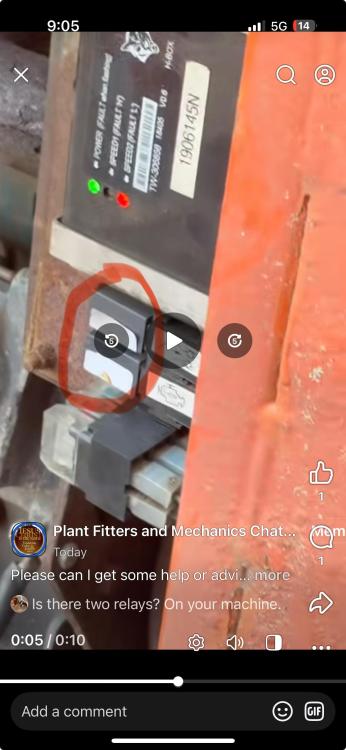
Hi all 2017 tw230 dhb chipper in feed green button when press won’t keep rollers turning only if held on green button black box speed fault 2 lights up solid when throttle turn over half way when turn throttle down light goes off also on hydrolic section at side of engine red light shows when green infeed pressed is this normal thanks please help all works and chips but only when green button held on checked all switches ✅ check stop bar switch ✅ checked relays ✅ checked throttle speed ✅ checked plug under chipper hopper ✅ IMG_8352.mov